Documentation MCP
The GameAnalytics Documentation MCP is a Model Context Protocol (MCP) server that connects your AI tools to the GameAnalytics product documentation. Once connected, your assistant can look up features, workflows, and configuration while you work, so you do not have to switch to the documentation site. An AI coding agent can also read the documentation and use it to instrument the SDK in your codebase.
It covers the full GameAnalytics product documentation, including feature guides, integration steps, and event tracking specifications. Your AI tool queries the documentation to answer questions, or uses it as a reference while you write and validate your implementation.
In Claude, you add it in one step from the connector directory. Every other tool uses a configuration file or a command, listed under Connect your AI tool.
Prefer a browser?
- Claude: add our official connector from the Claude library in one click, no configuration needed.
What you can use it for
- Find how a feature works without searching the documentation site by hand.
- Get step-by-step setup and configuration guidance in plain language.
- Look up SDK and event tracking details while you are writing code.
- Clarify a workflow or check how to configure something while building an integration.
- Have your AI coding agent instrument the GameAnalytics SDK in your codebase. It reads the documentation to learn the correct event structure, then writes the implementation for you.
- Pair it with the GameAnalytics MCP Server to cover both sides of the work. Use the Documentation MCP to instrument your game, and use the MCP Server to analyze the resulting data, all from the same AI tool.
For the kind of answers you get back, see Documentation MCP examples.
Connect your AI tool
Every tool connects to the same server endpoint:
https://mcp.docs.gameanalytics.com
Find your tool below and use the matching configuration.
Antigravity
{
  "mcpServers": {
    "GameAnalytics Documentation": {
      "serverUrl": "https://mcp.docs.gameanalytics.com"
    }
  }
}
Claude
Claude lists the server in its connector directory, so there is no configuration to write.
- Open GameAnalytics Documentation in the connector directory.
- Select Connect.
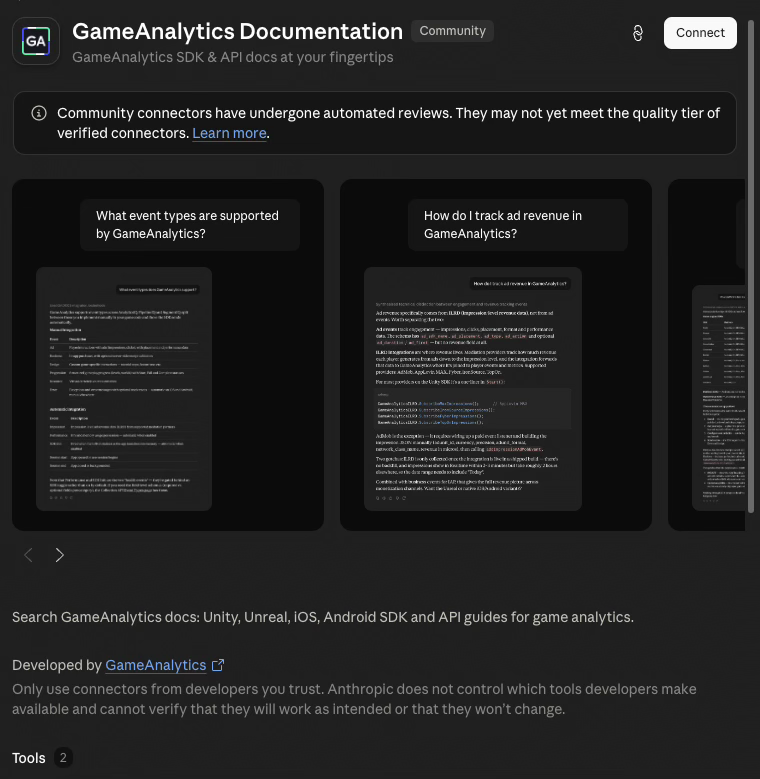
You can also search the directory for GameAnalytics and open the connector from the results.
This covers Claude in the browser and the Claude desktop app. For Claude Code in the terminal, use the command in the next section.
Claude Code
claude mcp add GameAnalytics Documentation https://mcp.docs.gameanalytics.com --transport http --scope user
Codex
codex mcp add --url https://mcp.docs.gameanalytics.com GameAnalytics Documentation
Cursor
{
"mcpServers": {
"GameAnalytics Documentation": {
"type": "http",
"url": "https://mcp.docs.gameanalytics.com"
}
}
}
Cursor Agent
{
"mcpServers": {
"GameAnalytics Documentation": {
"type": "http",
"url": "https://mcp.docs.gameanalytics.com"
}
}
}
Gemini CLI
gemini mcp add --transport http GameAnalytics Documentation https://mcp.docs.gameanalytics.com
Goose
{
"extensions": {
"GameAnalytics Documentation": {
"enabled": true,
"name": "GameAnalytics Documentation",
"type": "streamable_http",
"uri": "https://mcp.docs.gameanalytics.com",
"envs": {},
"env_keys": [],
"headers": {},
"description": "",
"timeout": 300,
"bundled": null,
"available_tools": []
}
}
}
JetBrains AI Assistant
{
"mcpServers": {
"GameAnalytics Documentation": {
"type": "http",
"url": "https://mcp.docs.gameanalytics.com"
}
}
}
Paste this configuration into Settings > Tools > AI Assistant > Model Context Protocol > Add > As JSON. Writing the configuration file directly is not supported, because the storage format is version-specific.
OpenCode
{
"mcp": {
"GameAnalytics Documentation": {
"type": "remote",
"url": "https://mcp.docs.gameanalytics.com"
}
}
}
Visual Studio Code
code --add-mcp '{"name":"GameAnalytics Documentation","type":"http","url":"https://mcp.docs.gameanalytics.com"}'
Windsurf
{
  "mcpServers": {
    "GameAnalytics Documentation": {
      "serverUrl": "https://mcp.docs.gameanalytics.com"
    }
  }
}
Windsurf supports both Studio and native HTTP connections.