Remote Configurations
GameAnalytics' Remote Configurations feature offers the ability to set up and tune values in your game's dashboard.
These values can be changed on the whim without needing to release a new version of the game.
The remote configs are a custom set of key-pair values.
Set up your Remote Configurations in the GameAnalytics dashboard.
Check the status
Remote Configurations may not be available immediately, as they need to be retrived from the server. The remote configurations may be populated later during the session.
Once the Remote Configurations have been downloaded, IsRemoteConfigsReady will return true.
- C++
- IAnalyticsProvider
- Blueprint
if(GameAnalytics->IsRemoteConfigsReady())
{
   // your code here
}
To be notified as soon as the Remote Configurations are downloaded, register a listener instead (see Listen for updates).
Not available inside the IAnalyticsProvider interface.

Remember the remote configs can be populated with an empty dictionary if the device is offline and there are no cached remote configs from a previous session.
Listen for updates
Instead of checking IsRemoteConfigsReady yourself, you can register a listener with RegisterRemoteConfigsListener. The listener is called when the Remote Configurations are updated, and receives all remote configs as a JSON string (the same content as GetRemoteConfigsContentAsString).
The listener is an FRemoteConfigListener delegate that takes one FString parameter.
- C++
- IAnalyticsProvider
- Blueprint
Declare the function that will handle the update as a UFUNCTION:
// MyActor.h
UFUNCTION()
void OnRemoteConfigsUpdated(FString RemoteConfigs);
Bind it to an FRemoteConfigListener and register it:
// MyActor.cpp
void AMyActor::BeginPlay()
{
    Super::BeginPlay();

    FRemoteConfigListener Listener;
    Listener.BindDynamic(this, &AMyActor::OnRemoteConfigsUpdated);

    UGameAnalytics* GameAnalytics = FGameAnalyticsModule::Get().GetInstance();
    GameAnalytics->RegisterRemoteConfigsListener(Listener);
}

void AMyActor::OnRemoteConfigsUpdated(FString RemoteConfigs)
{
    // remote configs are now available
    UGameAnalytics* GameAnalytics = FGameAnalyticsModule::Get().GetInstance();
    FString RemoteValue = GameAnalytics->GetRemoteConfigsValueAsString("my_remote_key", "default_value");
}
Not available inside the IAnalyticsProvider interface.
Use the “Register Remote Configs Listener” action. Connect its Listener pin to a custom event with one String input. The event is called with all remote configs as a JSON string.
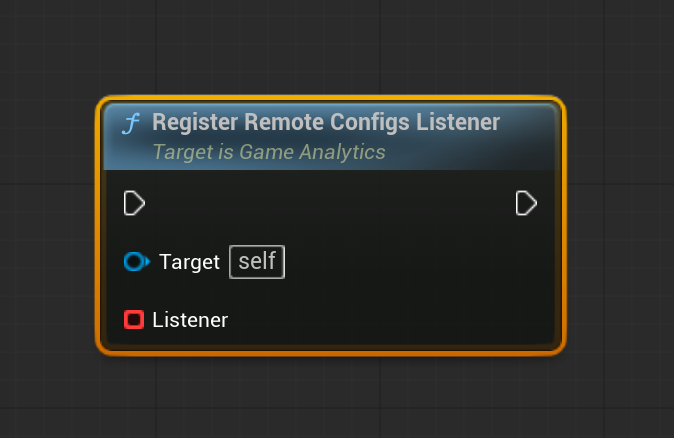
On iOS and Android only one listener is active at a time: registering a new listener replaces the previous one. Register your listener once, in one place.
The listener is only called for updates that happen after you register it. If the remote configs may already have been downloaded at that point, also check IsRemoteConfigsReady.
Retrieving values from Remote Configurations
Once the remote configurations have been downloaded, you can start using them inside your game. GameAnalytics supports 2 types of remote configurations:
- string
- json object
You can either get individual values by their key or get all remote configurations as a json string and parse it yourself. To get values out of a populated Remote Config you can use the following methods:
- C++
- IAnalyticsProvider
- Blueprint
  // retrieve a remote config as string with a fallback value
  FString RemoteValue = GameAnalytics->GetRemoteConfigsValueAsString("my_remote_key", "default_value");

  // retrieve a json object configuration
  TSharedPtr<FJsonObject> RemoteJson = GameAnalytics->GetRemoteConfigsValueAsJSON("my_remote_json");

  // get all remote configs as a valid json string
  FString RemoteConfigsContent = GameAnalytics->GetRemoteConfigsContentAsString();
Not available inside the IAnalyticsProvider interface.
