Event Tracking
GameAnalytics features the following event types:
| Event | Description |
|---|---|
| Ad | Ads shown and clicked, fill rate. |
| Business | In-App Purchases supporting receipt validation on GA servers. |
| Design | Submit custom event id’s. Useful for tracking metrics specifically needed for your game. |
| Error | Submit exception stack traces or custom error messages. |
| Health | Automatically submits health metrics related to your game such as FPS. |
| Impression | Impression data from different ad networks |
| Progression | Level attempts with Start, Fail & Complete event. |
| Resource | Managing the flow of virtual currencies - like gems or lives |
Read more about events here
If you are new to GameAnalytics and our Events, please read our event guide here You will get the most benefit of GameAnalytics when understanding what and how to track events.
Business Events
Business events are used to track IAP (real money transactions inside your game). With GameAnalytics for Unreal you can send events using either blueprints or C++.
GameAnalytics supports 2 types of business events:
- without store validation
- with store validation (only available for iOS and Android)
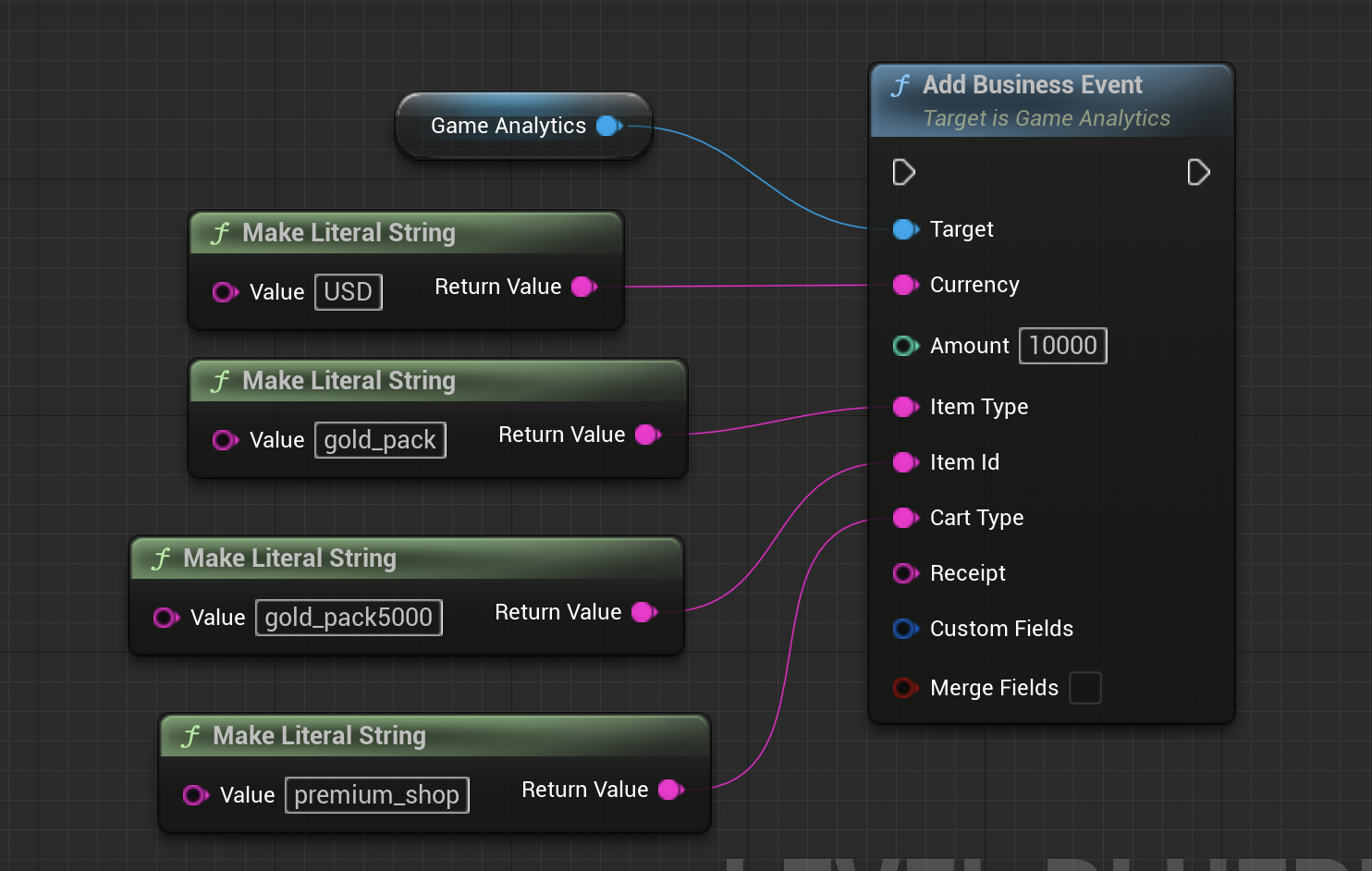
You can add a business event without validation as shown below:
- C++
- IAnalyticsProvider
- Blueprint
GameAnalytics->AddBusinessEvent("USD", 1000, "gold_pack", "gold_pack5000", "premium_shop");
GameAnalytics->RecordCurrencyPurchase("USD", 1000,
MakeAnalyticsEventAttributeArray(
"itemType", "gold_pack",
"itemId", "gold_pack5000",
"cartType", "premium_shop"));
All currency must be expressed in the lowest denomination (e.g: for USD the amount must be in cents)!
| Field | Type | Description | Example |
|---|---|---|---|
| itemType | string | The type / category of the item. | GoldPacks |
| itemId | string | Specific item bought. | 1000GoldPack |
| cartType | string | The game location of the purchase. | EndOfLevel |
The GameAnalytics action used is “Add Business Event”.
Game Currency Type should be set to the currency code in ISO 4217 format.
Receipt validation is supported for the following stores:
- App Store (iOS)
- Google Play Store (Android)
iOS
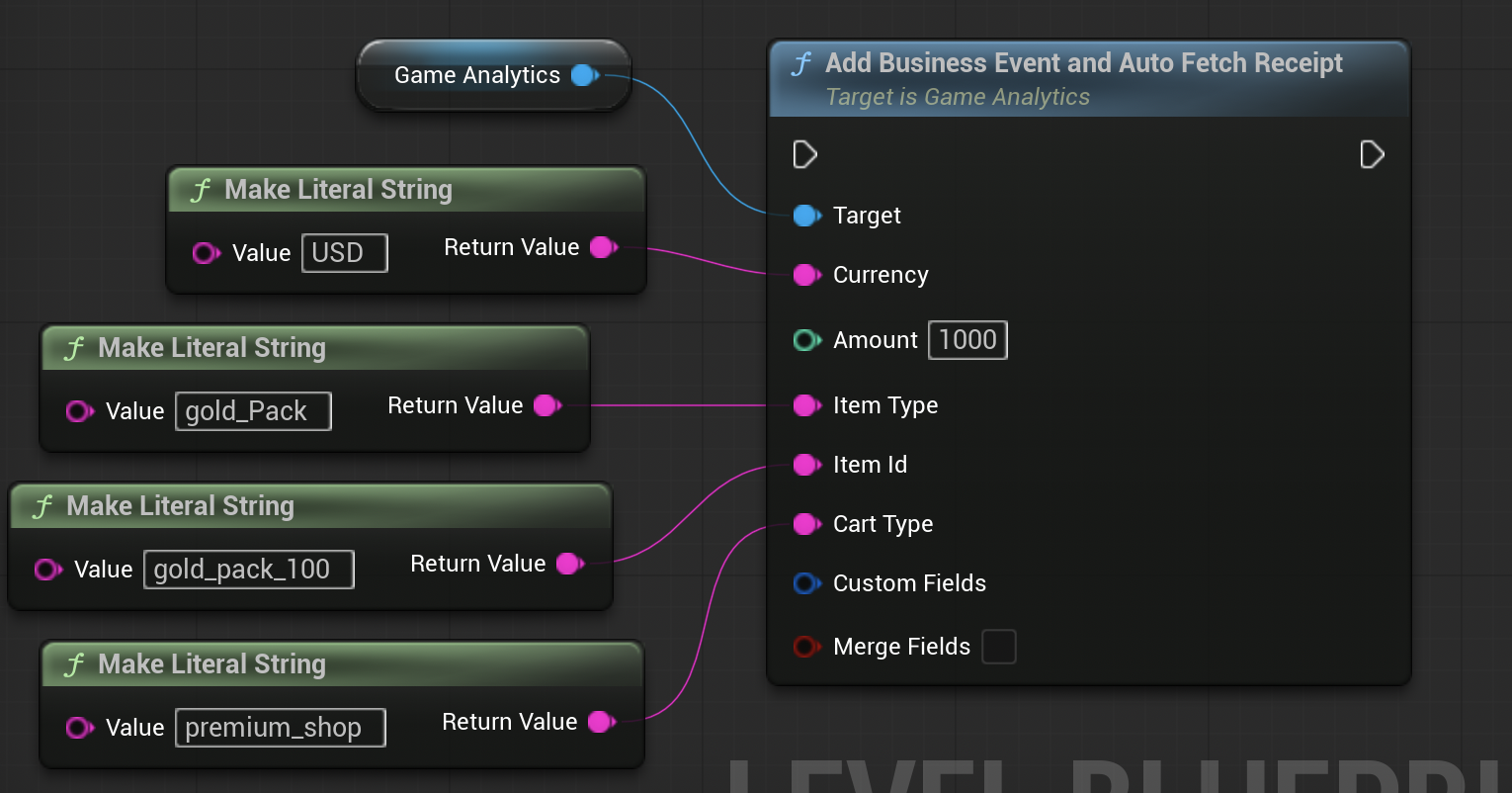
For iOS (iOS7+ only) you can also auto-fetch receipts like this (use “Add Business Event and Auto Fetch Receipt”).
- C++
- IAnalyticsProvider
- Blueprint
// auto fetch the receipt, iOS-only feature
GameAnalytics->AddBusinessEventAndAutoFetchReceipt("USD", 1000, "gold_pack", "gold_pack5000", "premium_shop");

FString Receipt = "[INSERT YOUR RECEIPT HERE]";

// alternatively you can manually add the receipt
GameAnalytics->AddBusinessEventWithReceipt("USD", 1000, "gold_pack", "gold_pack5000", "premium_shop",Receipt);
GameAnalytics->RecordCurrencyPurchase("USD", 1000,
MakeAnalyticsEventAttributeArray(
"itemType", "gold_pack",
"itemId", "gold_pack5000",
"cartType", "premium shop",
"autoFetchReceipt", true));
| iOS Fields | Type | Description | Example |
|---|---|---|---|
| receipt | base64 string | The App Store receipt. Nil allowed. Read more about App Store receipt here. | null |
Android
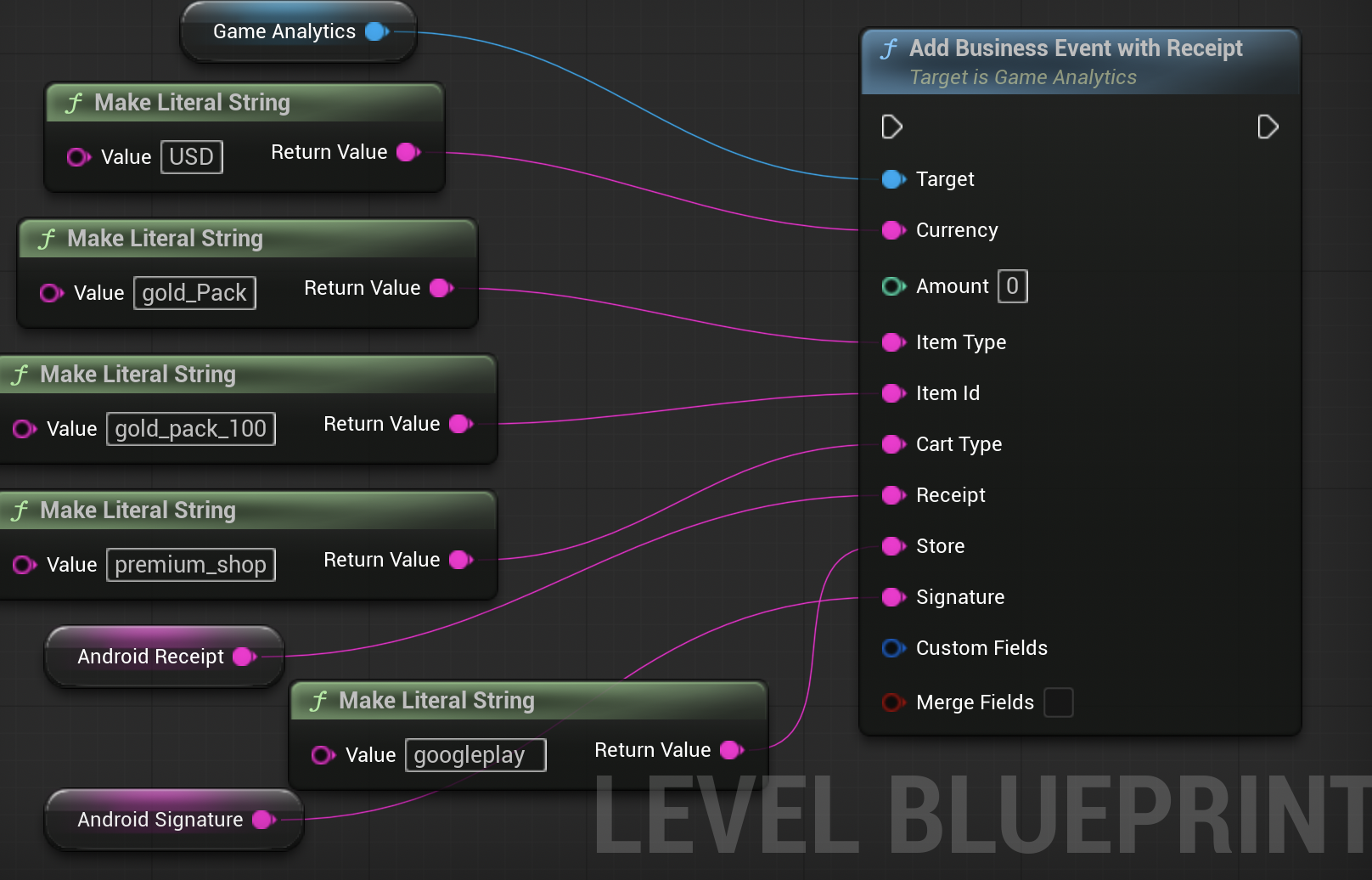
On Android you will also need to pass the following arguments for validating in-app purchases:
INAPP_PURCHASE_DATAINAPP_DATA_SIGNATURE- the store name
Read more about the Android signature and receipt here.
- C++
- IAnalyticsProvider
- Blueprint
// get the google play receipt
FString Receipt = "[INSERT YOUR INAPP_PURCHASE_DATA HERE]";
FString Store = "[INSERT THE STORE NAME HERE]";
FString Signature = "[INSERT YOUR INAPP_DATA_SIGNATURE HERE]";

GameAnalytics->AddBusinessEventWithReceipt("USD", 1000, "gold_pack", "gold_pack5000", "premium_shop", Receipt, Store, Signature);
// get the google play receipt
FString Receipt = "[INSERT YOUR INAPP_PURCHASE_DATA HERE]";
FString Store = "[INSERT THE STORE NAME HERE]";
FString Signature = "[INSERT YOUR INAPP_DATA_SIGNATURE HERE]";

GameAnalytics->RecordCurrencyPurchase("USD", 1000,
MakeAnalyticsEventAttributeArray(
"itemType", "gold_pack",
"itemId", "gold_pack5000",
"cartType", "premium shop",
"receipt", Receipt,
"signature", Signature,
"store", Store));
| Android Fields | Type | Description |
|---|---|---|
| signature | base64 string | INAPP_DATA_SIGNATURE. Null allowed. Read more here. |
| receipt | base64 string | INAPP_PURCHASE_DATA. Null allowed. Read more here. |
Find more information on Custom Event Fields and Data Export following the links.
For more information about the business event go here.
Ad Events
Ad events will only work on mobile platforms: iOS and Android
- C++
- IAnalyticsProvider
- Blueprint
// add a regular ad event
GameAnalytics->AddAdEvent(EGAAdAction::show, EGAAdType::interstitial, "admob", "level_end");

// add an ad event with watch duration
GameAnalytics->AddAdEventWithDuration(EGAAdAction::show, EGAAdType::video, "admob", "level_end", 5000);

// add an ad event with a failure reason
GameAnalytics->AddAdEventWithNoAdReason(EGAAdAction::failedshow, EGAAdType::interstitial, "admob", "level_end", EGAAdError::nofill);
Ad events are not supported by the IAnalyticsProvider interface.
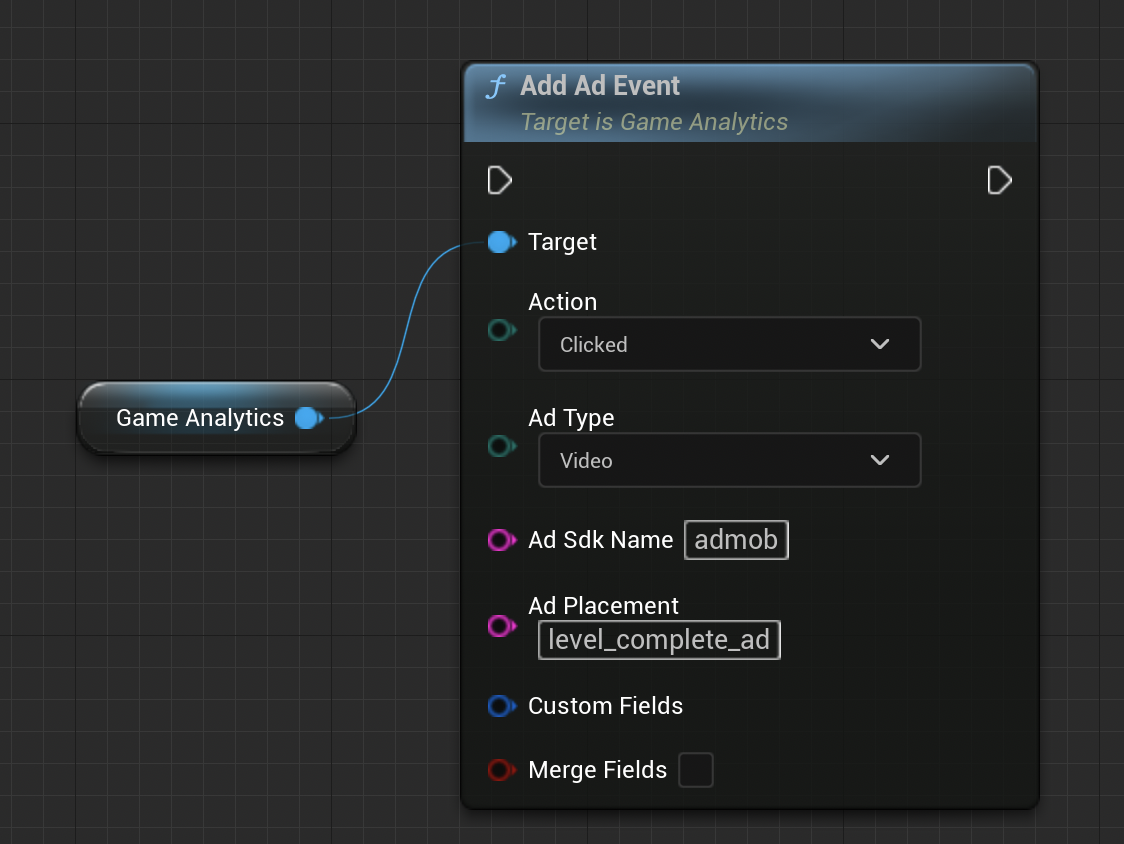
| Field | Type | Description | Example |
|---|---|---|---|
| adAction | enum | A defined enum for ad action (for example clicked). | EGAAdAction::clickedEGAAdAction::showEGAAdAction::failedshowEGAAdAction::rewardreceived |
| adType | enum | A defined enum for ad type (for example interstitial). | EGAAdType::videoEGAAdType::rewardedvideoEGAAdType::playableEGAAdType::interstitialEGAAdType::offerwallEGAAdType::banner |
| adSdkName | string | Name of the Ad/Ad mediation SDK. | admob |
| adPlacement | string | Identifier of ad in the game or the placement of it. | level_complete_ad |
| adPlacement | string | Identifier of ad in the game or the placement of it. | level_complete_ad |
| duration | int | Optional. Only used for video ads to track how long the user watched the video for. | 10 |
| noAdReason | enum | Optional. Used to track the reason for not being able to show an ad when needed (for example no fill). | EGAAdError::unknownEGAAdError::offlineEGAAdError::nofillEGAAdError::internalerrorEGAAdError::invalidrequestEGAAdError::unabletoprecache |
For more information about Ad Events go here.
Impression Events
Not all Ad SDKs will offer Unreal support (while support for iOS, Android and Unity is much more common).
The GameAnalytics Unreal SDK does not provide support for impression events. Impression events are only supported on Android and iOS platforms.
Read more about Impression Events here
Resource Events
Resources events are used to track your in-game economy. From setting up the event you will be able to see three types of events in the tool. Flow, the total balance from currency spent and rewarded. Sink is all currency spent on items, and lastly source, being all currency rewarded in game.
- C++
- IAnalyticsProvider
- Blueprint
// earn resources inside the game
GameAnalytics->AddResourceEvent(EGAResourceFlowType::source, "gold", 100, "quest", "kill_dragon_quest");

// spend resources inside the game
GameAnalytics->AddResourceEvent(EGAResourceFlowType::sink, "gold", 100, "weapon", "fire_sword");
AnalyticsProvider->RecordItemPurchase("kill_dragon_quest", 100,
MakeAnalyticsEventAttributeArray(
  "flowType", "source",
  "currency", "gold",
  "itemType", "quest"
));

AnalyticsProvider->RecordItemPurchase("fire_sword", 100,
MakeAnalyticsEventAttributeArray(
  "flowType", "sink",
  "currency", "gold",
  "itemType", "weapon"
));
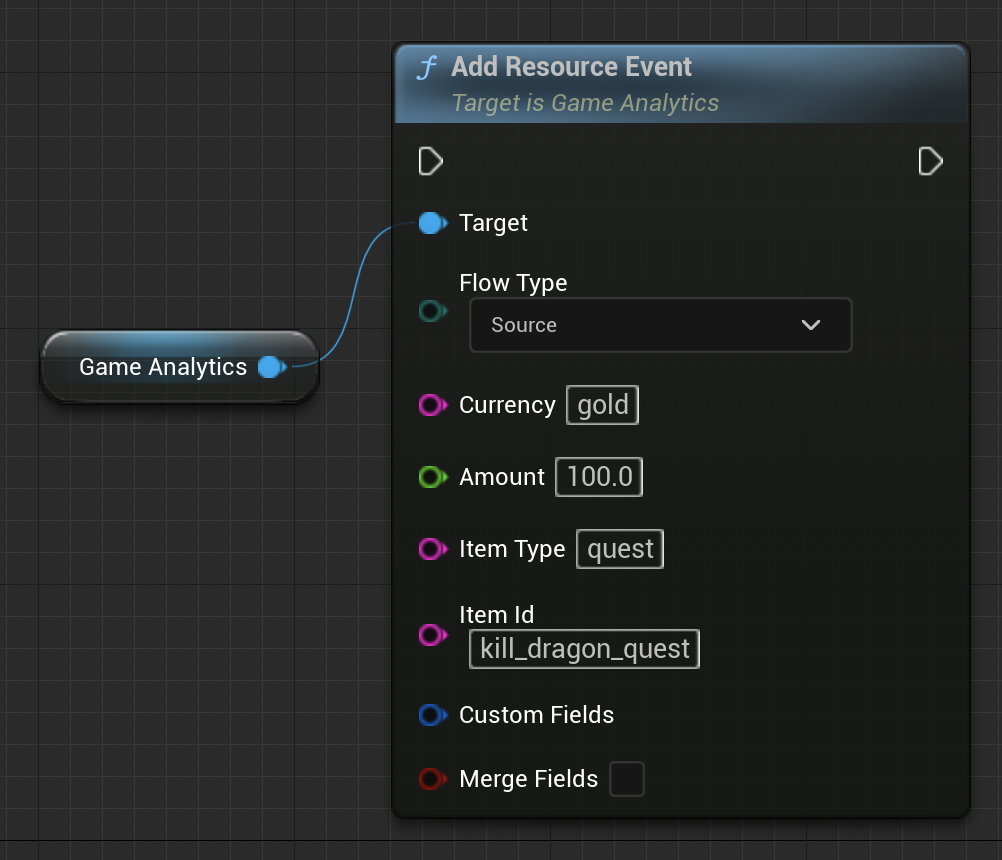
| Field | Type | Required | Description |
|---|---|---|---|
| flowType | enum | yes | Add (source) or substract (sink) resource. |
| currency | string | yes | One of the available currencies set in Project Settings for the GameAnalytics plugin. This string can only contain [A-Za-z] characters. |
| itemType | string | yes | One of the available item types set previously. |
Be careful to not call the resource event too often!
In a game where the user collect coins fairly fast you should not call a Source event on each pickup. Instead you should count the coins and send a single Source event when the user either completes or fails the level.
Find more information on Custom Event Fields and Data Export following the links.
Before being able to use resource currencies, they must first be set up in the Unreal Editor project settings.
For more information about Resource Events go here
Progression Events
Progression events are used to measure player progression in the game. They follow a 3 tier hierarchy structure (world, level and phase) to indicate a player’s path or place.
- C++
- IAnalyticsProvider
- Blueprint
// add a regular progression event
GameAnalytics->AddProgressionEvent(EGAProgressionStatus::complete, "world_1", "level_2", "dungeon");

// add a progression event with an optional score
GameAnalytics->AddProgressionEventWithScore(EGAProgressionStatus::complete, 1000, "world_1", "level_2", "dungeon");
// add a progression event with an optional score value
AnalyticsProvider->RecordProgress("complete", {"world_1", "level_2", "dungeon"}, MakeAnalyticsEventAttributeArray("value", 1000));
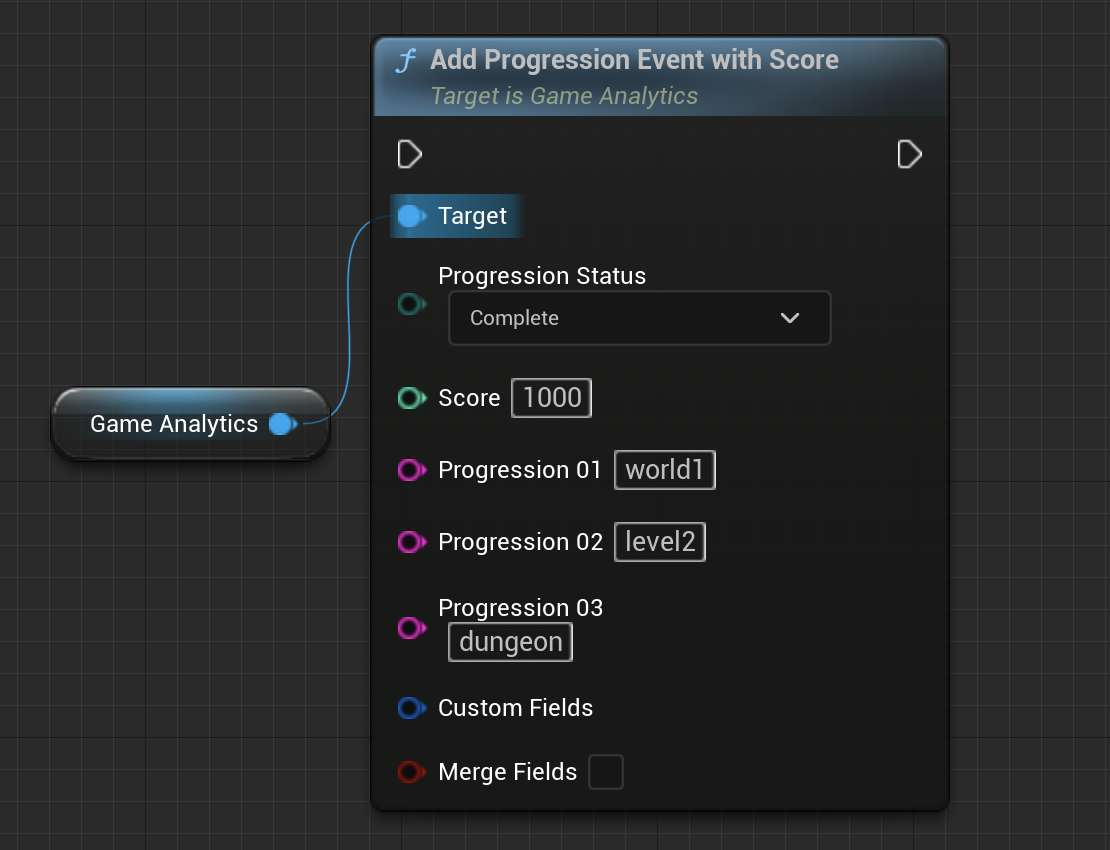
| Field | Type | Required | Description |
|---|---|---|---|
| progressionStatus | enum | yes | start, complete or fail |
| progression01 | string | yes | 1st progression (e.g. world01). |
| progression02 | string | no | 2nd progression (e.g. level01). |
| progression03 | string | no | 3rd progression (e.g. phase01). |
| score | int | no | Score of the attempt |
At least progression01 must be set for such events (an empty value is not allowed).
Progressions need to be set in order (e.g: you cannot have only progression01 and progression03, nor progression02 and progression03, you are required to start from 01 and continue)
Error Events
Used to track custom error events in the game. This event should be used when something goes wrong inside the game's logic (also note that unhandled exceptions & crashes will be automatically sent over as error events). It is possible to group the events by severity level and attach a message.
Error events will automatically provide (if available):
- filename
- function name
- line number
- C++
- IAnalyticsProvider
- Blueprint
// add a critical error event
GameAnalytics->AddErrorEvent(EGAErrorSeverity::critical, "Failed to load level");
// add a critical error event
AnalyticsProvider->RecordError("Failed to load level", MakeAnalyticsEventAttributeArray("severity", "critical"));
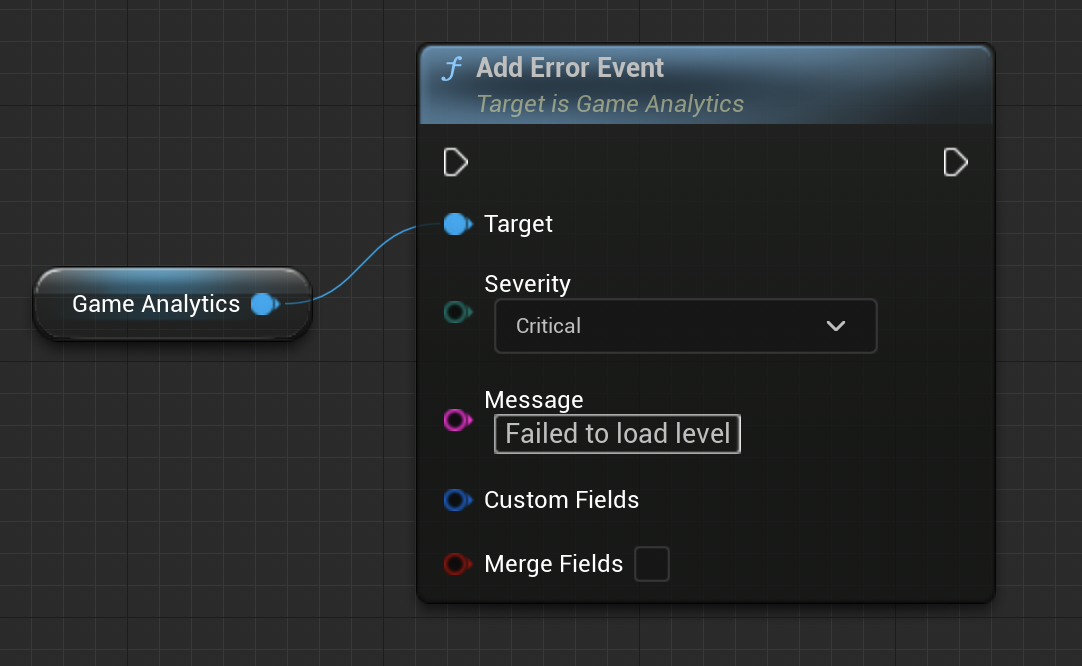
| Field | Type | Required | Description |
|---|---|---|---|
| severity | enum | yes | debug, info, warning, error or critical |
| message | string | yes | Custom error message |
Find more information on Custom Event Fields and Data Export following the links.
Read more about Error Events here
Design Events
Design events are custom events that can be used to track any other type of event not found in one of the previous categories.
The GameAnalytics actions that can be used to send Design events are: “Add Design Event” and “Add Design Event with Value”.
The event name is a String which can consist of 1 to 5 segments. Segments are separated by ':' and segments can have a max length of 64 characters. (e.g. "segment1:anotherSegment:gold").
- C++
- IAnalyticsProvider
- Blueprint
// add a regular design event
GameAnalytics->AddDesignEvent("player:kill:headshot");

// add a design event with an optional value
GameAnalytics->AddDesignEventWithValue("player:kill:headshot", 100.f);
// add a design event with an optional value
AnalyticsProvider->RecordEvent("player:kill:headshot", MakeAnalyticsEventAttributeArray("value", 100.f));
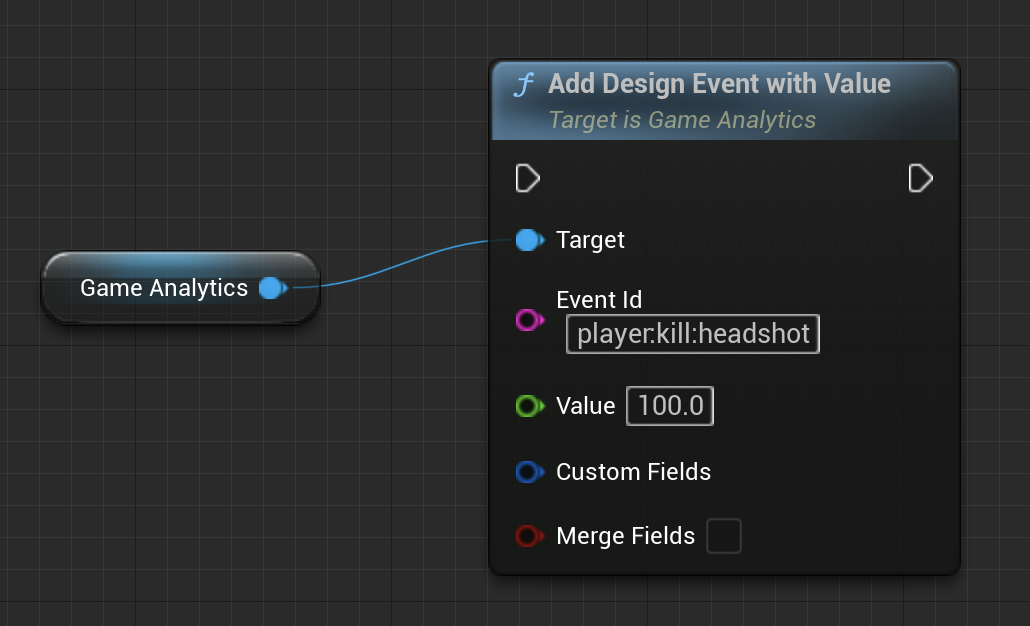
| Field | Type | Required | Description |
|---|---|---|---|
| eventId | string | yes | Event id |
| value | float | no | Optional custom value |
Find more information on Custom Event Fields and Data Export following the links.
For more information on the design event go here.
Custom Fields
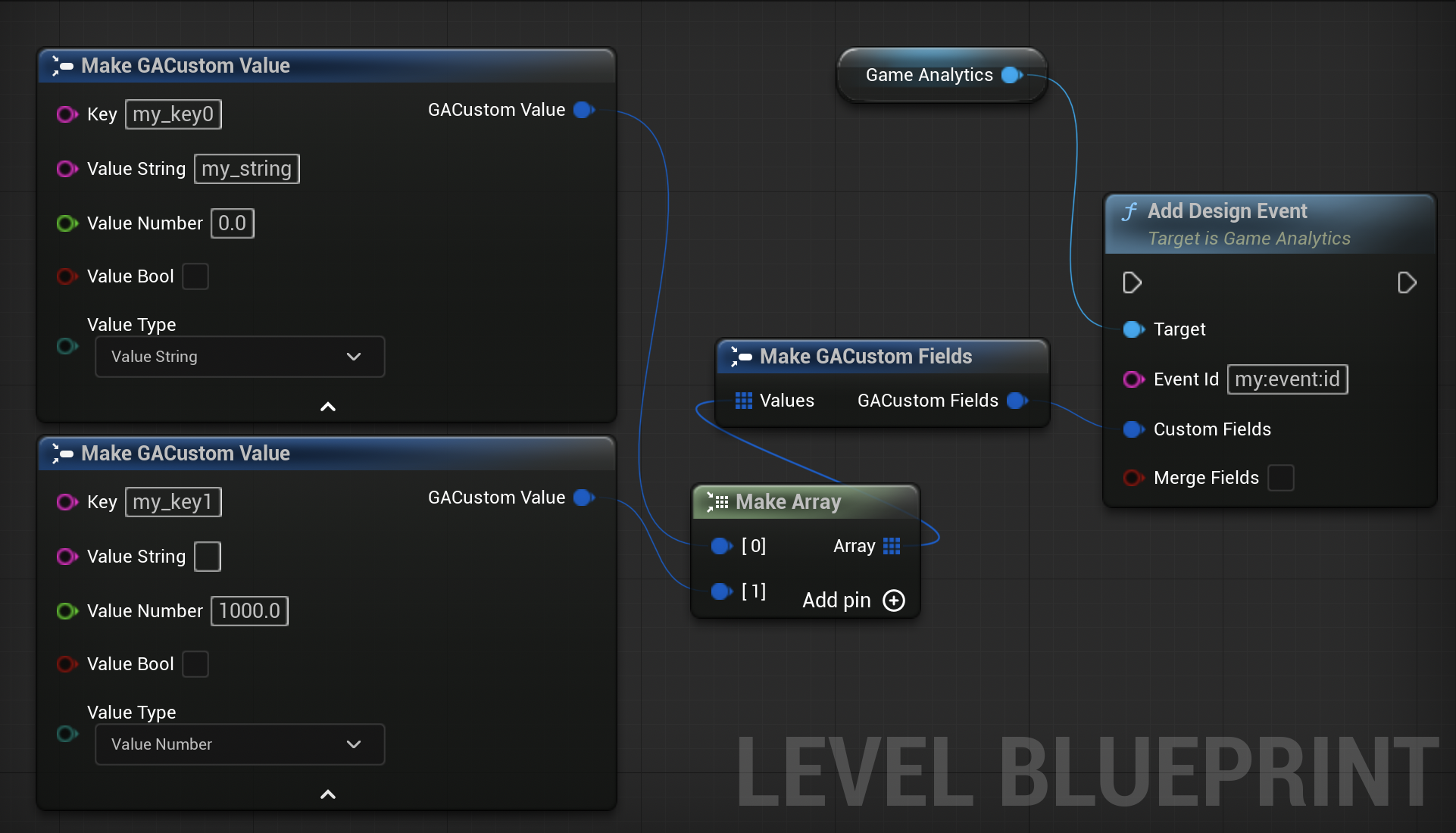
GameAnalytics allows you to setup up to 50 custom key-value pairs for any type of event. The following value types are supported:
- number (64-bit floating point)
- string
- boolean
- C++
- IAnalyticsProvider
- Blueprint
  // create your custom fields
FGACustomFields Fields;
Fields.Set(TEXT("my_bool"), true);
Fields.Set(TEXT("my_number"), 1000.f);
Fields.Set(TEXT("my_string"), FString(TEXT("halloween_event")));

// most event functions also support custom fields as an additional argument
GameAnalytics->AddDesignEventWithValue(TEXT("MyEvent"), 200, Fields);
Custom fields are not available inside the IAnalyticsProvider interface!