Game Ops
Remote Configs
GameAnalytics offers the option to setup remote configs in your dashboard that can be changed on the whim without needing to release a new version of the game. The remote configs are a custom set of key-pair values.
Checking if the remote configs are ready
The blueprint functions is called Is Remote Configs Ready, it will return true if the remote configs have been populated from the server.
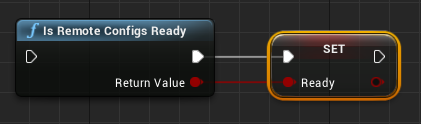
You can also check directly in C++ using the function below:
if(UGameAnalytics::isRemoteConfigsReady())
{
    // the remote configs are ready, add your code here
}
Remember the remote configs can be populated with an empty dictionary if the device is offline and there are no cached remote configs from a previous session.
Retrieving values from Remote Configs
To get values out of a populated Remote Config use the following methods:
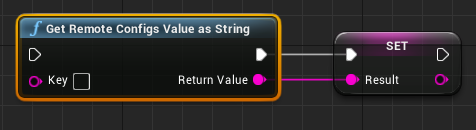
Or directly from C++:
// Without custom default value (using normal default value)
std::string value = UGameAnalytics::getRemoteConfigsValueAsString("key");
// With custom default value
std::string valueWithCustomDefaultValue = UGameAnalytics::getRemoteConfigsValueAsString("key", "myDefaultValue");
A/B Testing
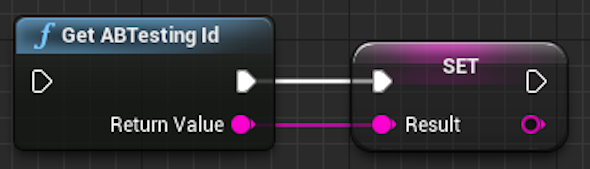
To get the value of A/B testing id or variant id use the following methods:
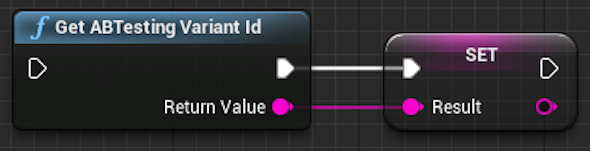
Or directly from C++:
// A/B testing id
std::string abTestingId = UGameAnalytics::getABTestingId();
// A/B testing variant id
std::string abTestingVariantId = UGameAnalytics::getABTestingVariantId();
Remember the A/B testing ids are first available when the Remote Configs are ready.